Overview
@kubiks/otel-resend provides OpenTelemetry instrumentation for the Resend email service Node.js SDK. Capture spans for every email operation with detailed metadata about recipients, subjects, and delivery status.
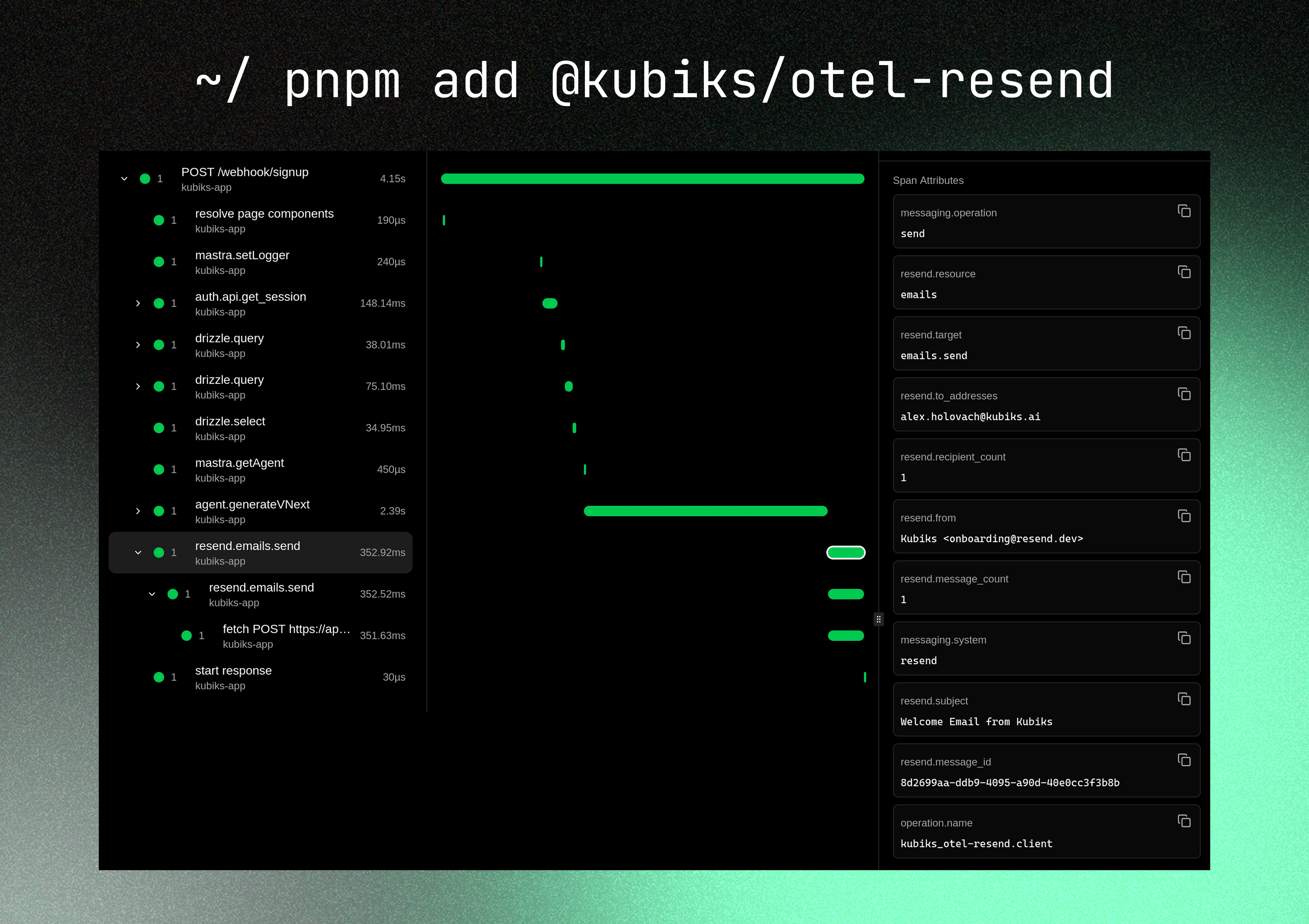
Visualize your email operations with detailed span information including recipients, subject lines, and delivery status—without capturing sensitive email content.
Installation
npm install @kubiks/otel-resend
Peer Dependencies: @opentelemetry/api >= 1.9.0, resend >= 3.0.0
Quick Start
import { Resend } from "resend" ;
import { instrumentResend } from "@kubiks/otel-resend" ;
const resend = instrumentResend ( new Resend ( process . env . RESEND_API_KEY ! ));
await resend . emails . send ({
from: "[email protected] " ,
to: [ "[email protected] " ],
subject: "Welcome" ,
html: "<p>Hello world</p>" ,
});
instrumentResend wraps the instance you already use—no configuration changes needed. Every SDK call creates a client span with useful attributes.
What Gets Traced
This instrumentation specifically wraps the resend.emails.send method (and its alias resend.emails.create), creating a single clean span for each email send operation.
Only metadata is captured—email content (HTML, text, attachments) is never included in traces for privacy and security.
Span Attributes
Each span includes rich metadata about the email operation:
Attribute Description Example messaging.systemConstant value resend resendmessaging.operationOperation type sendresend.resourceResource name emailsresend.targetFull operation target emails.sendresend.to_addressesComma-separated TO addresses [email protected] , [email protected] resend.cc_addressesComma-separated CC addresses (if present) [email protected] resend.bcc_addressesComma-separated BCC addresses (if present) [email protected] resend.recipient_countTotal number of recipients 3resend.fromSender email address [email protected] resend.subjectEmail subject Welcome to our serviceresend.template_idTemplate ID (if using templates) tmpl_123resend.message_idMessage ID returned by Resend email_123resend.message_countNumber of messages sent (always 1 for single sends) 1
The instrumentation captures email addresses and metadata to help with debugging and monitoring, while avoiding sensitive email content.
Usage Examples
Basic Email
Simple Email
Multiple Recipients
Plain Text Email
import { resend } from "@/lib/resend" ;
await resend . emails . send ({
from: "[email protected] " ,
to: "[email protected] " ,
subject: "Welcome to our platform" ,
html: "<h1>Welcome!</h1><p>Thanks for signing up.</p>" ,
});
// Traced with:
// - resend.from: "[email protected] "
// - resend.to_addresses: "[email protected] "
// - resend.subject: "Welcome to our platform"
// - resend.recipient_count: 1
With CC and BCC
BCC addresses are included in the span but remain hidden from other recipients as expected.
Using Email Templates
React Email Template
Resend Template
import { resend } from "@/lib/resend" ;
import { WelcomeEmail } from "@/emails/welcome" ;
await resend . emails . send ({
from: "[email protected] " ,
to: "[email protected] " ,
subject: "Welcome aboard!" ,
react: WelcomeEmail ({ name: "John" }),
});
With Attachments
import { resend } from "@/lib/resend" ;
import fs from "fs" ;
await resend . emails . send ({
from: "[email protected] " ,
to: "[email protected] " ,
subject: "Your Invoice" ,
html: "<p>Please find your invoice attached.</p>" ,
attachments: [
{
filename: "invoice.pdf" ,
content: fs . readFileSync ( "./invoice.pdf" ),
},
],
});
// Note: Attachment content is NOT captured in traces
Transactional Emails
Password Reset
Email Verification
Order Confirmation
import { resend } from "@/lib/resend" ;
export async function sendPasswordResetEmail ( email : string , token : string ) {
await resend . emails . send ({
from: "[email protected] " ,
to: email ,
subject: "Reset your password" ,
html: `
<h1>Password Reset Request</h1>
<p>Click the link below to reset your password:</p>
<a href="https://example.com/reset?token= ${ token } ">Reset Password</a>
<p>This link expires in 1 hour.</p>
` ,
});
}
Complete Integration Example
Here’s a complete example of Resend with OpenTelemetry in a Next.js application:
import { Resend } from "resend" ;
import { instrumentResend } from "@kubiks/otel-resend" ;
export const resend = instrumentResend (
new Resend ( process . env . RESEND_API_KEY ! )
);
import { resend } from "@/lib/resend" ;
export async function sendWelcomeEmail ( email : string , name : string ) {
try {
const { data , error } = await resend . emails . send ({
from: "[email protected] " ,
to: email ,
subject: `Welcome ${ name } !` ,
html: `
<h1>Welcome to our platform, ${ name } !</h1>
<p>We're excited to have you on board.</p>
` ,
});
if ( error ) {
console . error ( "Failed to send welcome email:" , error );
return { success: false , error };
}
return { success: true , messageId: data ?. id };
} catch ( error ) {
console . error ( "Error sending email:" , error );
return { success: false , error };
}
}
export async function sendNotification (
email : string ,
subject : string ,
message : string
) {
const { data , error } = await resend . emails . send ({
from: "[email protected] " ,
to: email ,
subject ,
html: `<p> ${ message } </p>` ,
});
return { data , error };
}
app/api/auth/signup/route.ts
import { NextRequest , NextResponse } from "next/server" ;
import { sendWelcomeEmail } from "@/lib/email" ;
export async function POST ( request : NextRequest ) {
const { email , name } = await request . json ();
// Create user...
// Send welcome email (automatically traced)
const result = await sendWelcomeEmail ( email , name );
if ( ! result . success ) {
return NextResponse . json (
{ error: "Failed to send welcome email" },
{ status: 500 }
);
}
return NextResponse . json ({
success: true ,
messageId: result . messageId
});
}
"use server" ;
import { resend } from "@/lib/resend" ;
export async function sendContactFormEmail (
name : string ,
email : string ,
message : string
) {
const { data , error } = await resend . emails . send ({
from: "[email protected] " ,
to: "[email protected] " ,
replyTo: email ,
subject: `Contact Form: ${ name } ` ,
html: `
<h2>New Contact Form Submission</h2>
<p><strong>Name:</strong> ${ name } </p>
<p><strong>Email:</strong> ${ email } </p>
<p><strong>Message:</strong></p>
<p> ${ message } </p>
` ,
});
if ( error ) {
return { success: false , error: error . message };
}
return { success: true , messageId: data ?. id };
}
Best Practices
Use Environment Variables
Always store API keys in environment variables: const resend = instrumentResend (
new Resend ( process . env . RESEND_API_KEY ! )
);
Never commit API keys to version control.
Always check for errors when sending emails: const { data , error } = await resend . emails . send ({
from: "[email protected] " ,
to: email ,
subject: "Test" ,
html: "<p>Test</p>" ,
});
if ( error ) {
console . error ( "Email error:" , error );
// Handle error appropriately
return ;
}
console . log ( "Email sent:" , data ?. id );
Set up domain verification in Resend for production:
Be mindful of Resend rate limits and implement appropriate rate limiting: import { Ratelimit } from "@upstash/ratelimit" ;
import { Redis } from "@upstash/redis" ;
const ratelimit = new Ratelimit ({
redis: Redis . fromEnv (),
limiter: Ratelimit . slidingWindow ( 10 , "1 h" ), // 10 emails per hour
});
export async function sendEmail ( to : string , subject : string , html : string ) {
const { success } = await ratelimit . limit ( to );
if ( ! success ) {
throw new Error ( "Rate limit exceeded" );
}
return await resend . emails . send ({
from: "[email protected] " ,
to ,
subject ,
html ,
});
}
Use React Email or Resend templates for maintainable email content: import { WelcomeEmail } from "@/emails/welcome" ;
await resend . emails . send ({
from: "[email protected] " ,
to: email ,
subject: "Welcome!" ,
react: WelcomeEmail ({ name: userName }),
});
Troubleshooting
Ensure OpenTelemetry is properly configured: import { NodeSDK } from "@opentelemetry/sdk-node" ;
const sdk = new NodeSDK ({
// ... configuration
});
sdk . start ();
The message ID is only available after successful email sending. Check for errors: const { data , error } = await resend . emails . send ({ ... });
if ( error ) {
console . error ( "No message ID because of error:" , error );
} else {
console . log ( "Message ID:" , data ?. id );
}
Check your Resend dashboard for delivery status. Common issues:
Domain not verified
Invalid recipient address
Rate limits exceeded
API key issues
Integration with React Email
Email Component
Send Email
// emails/welcome.tsx
import {
Body ,
Container ,
Head ,
Heading ,
Html ,
Link ,
Preview ,
Text ,
} from "@react-email/components" ;
interface WelcomeEmailProps {
name : string ;
}
export function WelcomeEmail ({ name } : WelcomeEmailProps ) {
return (
< Html >
< Head />
< Preview > Welcome to our platform !</ Preview >
< Body style = { main } >
< Container style = { container } >
< Heading style = { h1 } > Welcome , { name } !</ Heading >
< Text style = { text } >
Thanks for joining us . We 're excited to have you on board .
</ Text >
< Link href = "https://example.com/getting-started" style = { link } >
Get Started
</ Link >
</ Container >
</ Body >
</ Html >
);
}
const main = { backgroundColor: "#f6f9fc" , fontFamily: "sans-serif" };
const container = { margin: "0 auto" , padding: "20px 0 48px" };
const h1 = { fontSize: "32px" , fontWeight: "bold" };
const text = { fontSize: "16px" , lineHeight: "26px" };
const link = { color: "#5e6ad2" , textDecoration: "underline" };
Resources
License
MIT