Overview
@kubiks/otel-upstash-queues provides comprehensive OpenTelemetry instrumentation for Upstash QStash . Capture spans for both message publishing and consumption with detailed operation metadata and delivery tracking.
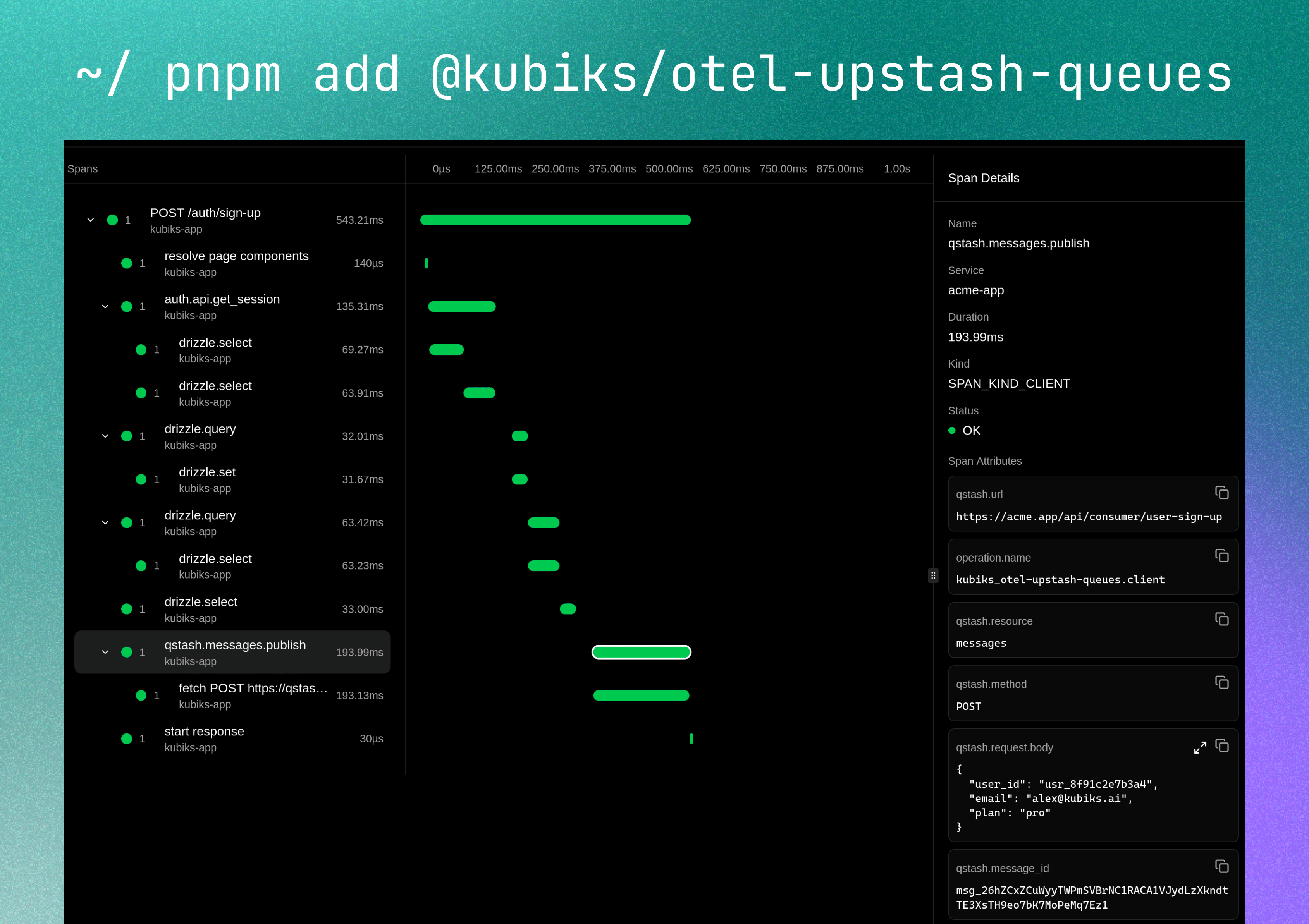
Visualize your message queue operations with detailed span information including message publishing, callbacks, and delivery tracking—from producer to consumer.
Installation
npm install @kubiks/otel-upstash-queues
Peer Dependencies: @opentelemetry/api >= 1.9.0, @upstash/qstash >= 2.0.0
Quick Start
Publishing Messages
import { Client } from "@upstash/qstash" ;
import { instrumentUpstash } from "@kubiks/otel-upstash-queues" ;
const client = instrumentUpstash (
new Client ({ token: process . env . QSTASH_TOKEN ! })
);
await client . publishJSON ({
url: "https://your-api-endpoint.com/process-image" ,
body: { imageId: "123" },
});
instrumentUpstash wraps the QStash client instance you already use—no configuration changes needed. Every SDK call creates a client span with useful attributes.
Consuming Messages
// app/api/process/route.ts
import { verifySignatureAppRouter } from "@upstash/qstash/nextjs" ;
import { instrumentConsumer } from "@kubiks/otel-upstash-queues" ;
async function handler ( request : Request ) {
const data = await request . json ();
// Process your message
await processImage ( data . imageId );
return Response . json ({ success: true });
}
// Instrument first, then verify signature
export const POST = verifySignatureAppRouter ( instrumentConsumer ( handler ));
instrumentConsumer wraps your message handler to trace message consumption, creating a SERVER span for each message received and processed.
What Gets Traced
This instrumentation provides two main functions:
instrumentUpstash Wraps the QStash client to trace message publishing with SpanKind.CLIENT
instrumentConsumer Wraps your message handler to trace message consumption with SpanKind.SERVER
Configuration
With Body Capture
Optionally capture request/response bodies for debugging:
const client = instrumentUpstash (
new Client ({ token: process . env . QSTASH_TOKEN ! }),
{
captureBody: true , // Enable body capture (default: false)
maxBodyLength: 2048 , // Max characters to capture (default: 1024)
}
);
Body capture is disabled by default to protect sensitive data. Only enable in secure, development environments.
Span Attributes
Publisher Spans (instrumentUpstash)
Attribute Description Example messaging.systemConstant value qstash qstashmessaging.operationOperation type publishqstash.resourceResource name messagesqstash.targetFull operation target messages.publishqstash.urlTarget URL for the message https://example.com/api/processqstash.methodHTTP method (default: POST) POST, PUT, GETqstash.message_idMessage ID returned by QStash msg_123qstash.delayDelay before processing (seconds or string) 60 or "1h"qstash.not_beforeUnix timestamp for earliest processing 1672531200qstash.deduplication_idDeduplication ID for idempotent operations unique-id-123qstash.retriesNumber of retry attempts (max) 3qstash.callback_urlSuccess callback URL https://example.com/callbackqstash.failure_callback_urlFailure callback URL https://example.com/failure
Consumer Spans (instrumentConsumer)
Attribute Description Example messaging.systemConstant value qstash qstashmessaging.operationOperation type receiveqstash.resourceResource name messagesqstash.targetFull operation target messages.receiveqstash.message_idMessage ID from QStash msg_456qstash.retriedNumber of times retried (actual count) 2qstash.schedule_idSchedule ID (if from scheduled message) schedule_123qstash.caller_ipIP address of the caller 192.168.1.1http.status_codeHTTP response status code 200
Body/Payload Attributes (Optional)
When captureBody is enabled:
Attribute Description Captured By qstash.request.bodyRequest/message body content Both publisher and consumer qstash.response.bodyResponse body content Consumer only
Usage Examples
Basic Message Publishing
Simple Message
Custom Method
With Headers
import { client } from "@/lib/qstash" ;
await client . publishJSON ({
url: "https://your-api.com/webhook" ,
body: {
userId: "user_123" ,
action: "process_data" ,
},
});
// Traced with:
// - qstash.url: "https://your-api.com/webhook"
// - qstash.method: "POST"
// - qstash.message_id: "msg_..."
Delayed Message Publishing
Delay in Seconds
Human-Readable Delay
Scheduled Time
// Delay message processing by 60 seconds
await client . publishJSON ({
url: "https://your-api.com/delayed-task" ,
body: { taskId: "task_456" },
delay: 60 ,
});
// Traced with:
// - qstash.delay: 60
Message with Callbacks
Success Callback
Success and Failure Callbacks
await client . publishJSON ({
url: "https://your-api.com/process" ,
body: { orderId: "order_123" },
callback: "https://your-api.com/success" ,
});
// Traced with:
// - qstash.callback_url: "https://your-api.com/success"
Retries and Deduplication
With Retries
With Deduplication
Combined
await client . publishJSON ({
url: "https://your-api.com/critical-task" ,
body: { taskId: "critical_123" },
retries: 5 ,
});
// Traced with:
// - qstash.retries: 5
Message Consumer
Basic Consumer
With Body Capture
With Error Handling
// app/api/process/route.ts
import { verifySignatureAppRouter } from "@upstash/qstash/nextjs" ;
import { instrumentConsumer } from "@kubiks/otel-upstash-queues" ;
async function handler ( request : Request ) {
const data = await request . json ();
// Process your message
console . log ( "Processing:" , data );
await processTask ( data );
return Response . json ({ success: true });
}
// Instrument first, then verify signature
export const POST = verifySignatureAppRouter ( instrumentConsumer ( handler ));
// Traced with:
// - qstash.message_id: from QStash header
// - qstash.retried: retry count
// - http.status_code: response status
Complete Integration Example
Here’s a complete example of QStash with OpenTelemetry in a Next.js application:
Setup
import { Client } from "@upstash/qstash" ;
import { instrumentUpstash } from "@kubiks/otel-upstash-queues" ;
export const client = instrumentUpstash (
new Client ({
token: process . env . QSTASH_TOKEN ! ,
}),
{
captureBody: process . env . NODE_ENV === "development" ,
maxBodyLength: 2048 ,
}
);
Publishing Messages
"use server" ;
import { client } from "@/lib/qstash" ;
export async function enqueueImageProcessing ( imageId : string ) {
try {
const result = await client . publishJSON ({
url: ` ${ process . env . NEXT_PUBLIC_URL } /api/process/image` ,
body: { imageId },
retries: 3 ,
deduplicationId: `image- ${ imageId } ` ,
});
return { success: true , messageId: result . messageId };
} catch ( error ) {
console . error ( "Failed to enqueue task:" , error );
return { success: false , error: error . message };
}
}
export async function scheduleReportGeneration ( reportId : string , delay : string ) {
const result = await client . publishJSON ({
url: ` ${ process . env . NEXT_PUBLIC_URL } /api/process/report` ,
body: { reportId },
delay ,
callback: ` ${ process . env . NEXT_PUBLIC_URL } /api/callbacks/report-success` ,
failureCallback: ` ${ process . env . NEXT_PUBLIC_URL } /api/callbacks/report-failure` ,
});
return { messageId: result . messageId };
}
Consuming Messages
app/api/process/image/route.ts
import { verifySignatureAppRouter } from "@upstash/qstash/nextjs" ;
import { instrumentConsumer } from "@kubiks/otel-upstash-queues" ;
async function handler ( request : Request ) {
const { imageId } = await request . json ();
console . log ( `Processing image: ${ imageId } ` );
// Simulate image processing
await processImage ( imageId );
return Response . json ({
success: true ,
imageId ,
processedAt: new Date (). toISOString ()
});
}
export const POST = verifySignatureAppRouter (
instrumentConsumer ( handler , {
captureBody: true ,
maxBodyLength: 1024 ,
})
);
async function processImage ( imageId : string ) {
// Your image processing logic
await new Promise ( resolve => setTimeout ( resolve , 1000 ));
console . log ( `Image ${ imageId } processed` );
}
app/api/process/report/route.ts
import { verifySignatureAppRouter } from "@upstash/qstash/nextjs" ;
import { instrumentConsumer } from "@kubiks/otel-upstash-queues" ;
async function handler ( request : Request ) {
const { reportId } = await request . json ();
try {
const report = await generateReport ( reportId );
return Response . json ({ success: true , report });
} catch ( error ) {
console . error ( "Report generation failed:" , error );
return Response . json (
{ success: false , error: error . message },
{ status: 500 }
);
}
}
export const POST = verifySignatureAppRouter ( instrumentConsumer ( handler ));
async function generateReport ( reportId : string ) {
// Your report generation logic
return { id: reportId , status: "completed" };
}
Callback Handlers
app/api/callbacks/report-success/route.ts
import { verifySignatureAppRouter } from "@upstash/qstash/nextjs" ;
async function handler ( request : Request ) {
const data = await request . json ();
console . log ( "Report generated successfully:" , data );
// Update database, send notification, etc.
return Response . json ({ received: true });
}
export const POST = verifySignatureAppRouter ( handler );
app/api/callbacks/report-failure/route.ts
import { verifySignatureAppRouter } from "@upstash/qstash/nextjs" ;
async function handler ( request : Request ) {
const data = await request . json ();
console . error ( "Report generation failed:" , data );
// Log error, notify admin, etc.
return Response . json ({ received: true });
}
export const POST = verifySignatureAppRouter ( handler );
Best Practices
Always Use Signature Verification
Always verify QStash signatures to ensure messages are authentic: import { verifySignatureAppRouter } from "@upstash/qstash/nextjs" ;
export const POST = verifySignatureAppRouter (
instrumentConsumer ( handler )
);
Use Deduplication for Idempotency
Use deduplication IDs to prevent duplicate processing: await client . publishJSON ({
url: "https://api.example.com/process" ,
body: { orderId },
deduplicationId: `order- ${ orderId } ` ,
});
Configure Appropriate Retries
Use Callbacks for Monitoring
Implement callbacks to track message processing: await client . publishJSON ({
url: "https://api.example.com/process" ,
body: { taskId },
callback: "https://api.example.com/callbacks/success" ,
failureCallback: "https://api.example.com/callbacks/failure" ,
});
Always handle errors in consumer handlers: async function handler ( request : Request ) {
try {
const data = await request . json ();
await processTask ( data );
return Response . json ({ success: true });
} catch ( error ) {
console . error ( "Processing failed:" , error );
return Response . json (
{ success: false , error: error . message },
{ status: 500 }
);
}
}
Advanced Patterns
async function enqueueBatch ( tasks : Task []) {
const results = await Promise . allSettled (
tasks . map ( task =>
client . publishJSON ({
url: ` ${ process . env . API_URL } /process` ,
body: task ,
deduplicationId: `task- ${ task . id } ` ,
})
)
);
return results ;
}
async function enqueueWithPriority ( task : Task , priority : "high" | "normal" ) {
await client . publishJSON ({
url: ` ${ process . env . API_URL } /process` ,
headers: {
"X-Priority" : priority ,
},
body: task ,
delay: priority === "high" ? 0 : 60 , // High priority: immediate
});
}
async function handler ( request : Request ) {
const retryCount = parseInt (
request . headers . get ( "Upstash-Retried" ) || "0"
);
// If max retries reached, send to DLQ
if ( retryCount >= 3 ) {
await sendToDeadLetterQueue ( await request . json ());
return Response . json ({ handled: true });
}
// Normal processing
await processTask ( await request . json ());
return Response . json ({ success: true });
}
Troubleshooting
Ensure OpenTelemetry is initialized before using QStash: import { NodeSDK } from "@opentelemetry/sdk-node" ;
const sdk = new NodeSDK ({
// ... configuration
});
sdk . start ();
Signature Verification Failing
Make sure environment variables are set correctly: QSTASH_TOKEN = your_token
QSTASH_CURRENT_SIGNING_KEY = your_current_key
QSTASH_NEXT_SIGNING_KEY = your_next_key
Messages Not Being Processed
Check that your endpoint is:
Publicly accessible
Returns 2xx status codes
Responds within timeout (default: 2 minutes)
Has signature verification enabled
Ensure instrumentConsumer is called before verifySignatureAppRouter: // Correct order
export const POST = verifySignatureAppRouter (
instrumentConsumer ( handler )
);
// Wrong order
export const POST = instrumentConsumer (
verifySignatureAppRouter ( handler )
);
Resources
License
MIT