> ## Documentation Index
> Fetch the complete documentation index at: https://docs.kubiks.ai/llms.txt
> Use this file to discover all available pages before exploring further.
# Upstash Workflow
> OpenTelemetry instrumentation for Upstash Workflow SDK
## Overview
`@kubiks/otel-upstash-workflow` provides comprehensive OpenTelemetry instrumentation for the [Upstash Workflow SDK](https://upstash.com/docs/workflow). Capture spans for workflow executions, steps, sleep operations, API calls, and event waiting with detailed performance metrics.
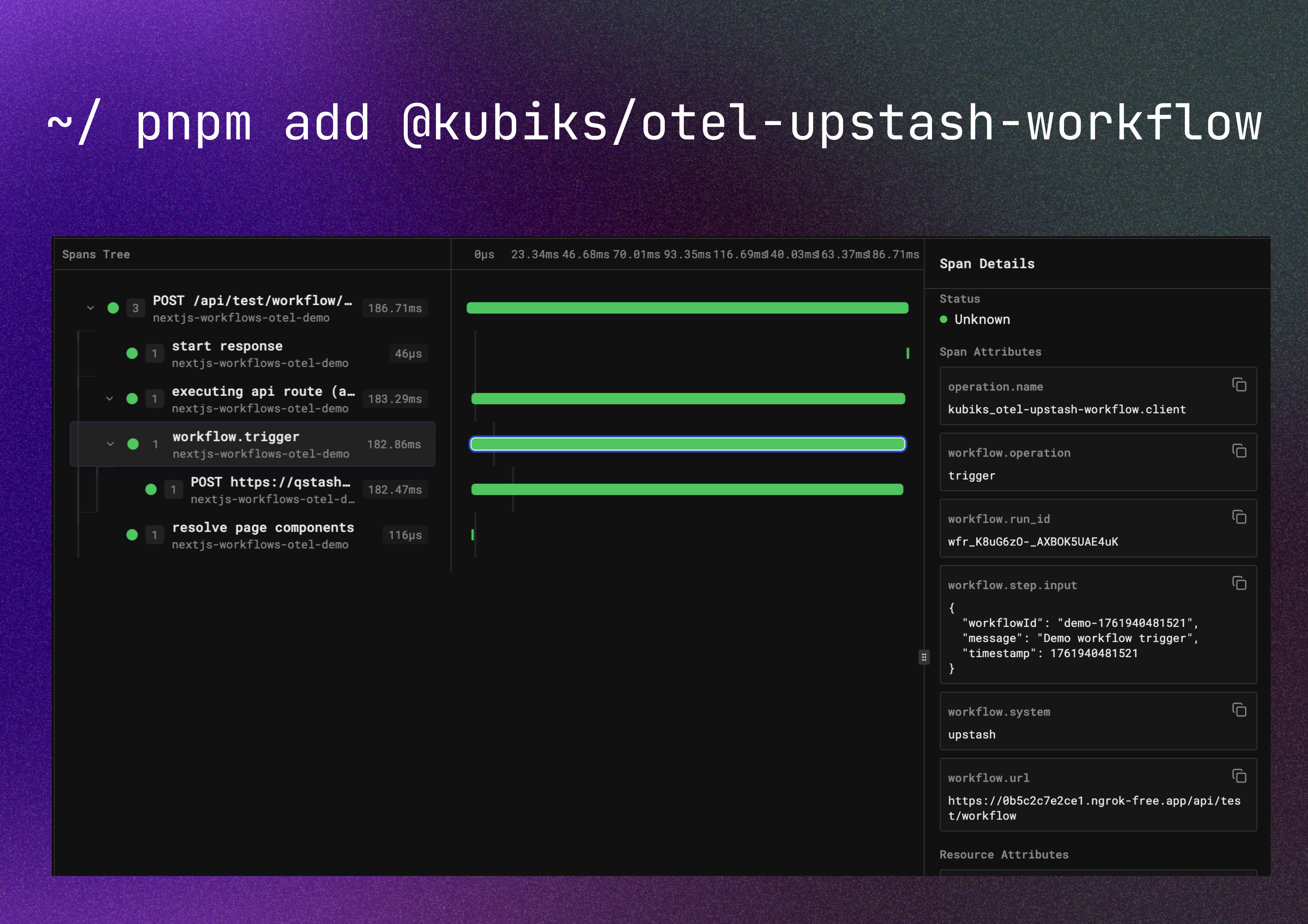 Visualize your workflow executions with detailed span information including steps, sleep operations, API calls, and performance metrics.
**Pre-release Note:** This package instruments the Upstash Workflow SDK, which is currently in pre-release. The API may change as the Workflow SDK evolves.
## Installation
```bash npm theme={null}
npm install @kubiks/otel-upstash-workflow
```
```bash pnpm theme={null}
pnpm add @kubiks/otel-upstash-workflow
```
```bash yarn theme={null}
yarn add @kubiks/otel-upstash-workflow
```
**Peer Dependencies:** `@opentelemetry/api` >= 1.9.0, `@upstash/workflow` >= 0.0.0
## Quick Start
### Instrumenting Workflow Handlers
```typescript theme={null}
import { serve as originalServe } from "@upstash/workflow";
import { instrumentWorkflowServe } from "@kubiks/otel-upstash-workflow";
const serve = instrumentWorkflowServe(originalServe);
export const POST = serve(async (context) => {
const result1 = await context.run("step-1", async () => {
return await processData();
});
await context.sleep("wait-5s", 5);
const result2 = await context.run("step-2", async () => {
return await saveResults(result1);
});
return result2;
});
```
`instrumentWorkflowServe` wraps the serve function to trace the entire workflow execution and all steps—no configuration changes needed. Every workflow execution creates a server span with child spans for each step.
### Instrumenting Workflow Client
```typescript theme={null}
import { Client } from "@upstash/workflow";
import { instrumentWorkflowClient } from "@kubiks/otel-upstash-workflow";
const client = instrumentWorkflowClient(
new Client({ baseUrl: process.env.QSTASH_URL!, token: process.env.QSTASH_TOKEN! })
);
await client.trigger({
url: "https://your-app.com/api/workflow",
body: { data: "example" },
});
```
`instrumentWorkflowClient` wraps the workflow client to trace workflow triggers, creating client spans for each trigger operation.
## Configuration
### With Step Data Capture
Optionally capture step inputs and outputs for debugging:
```typescript theme={null}
const serve = instrumentWorkflowServe(originalServe, {
captureStepData: true, // Enable step data capture (default: false)
maxStepDataLength: 2048, // Max characters to capture (default: 1024)
});
export const POST = serve(async (context) => {
// Your workflow - all steps are traced with input/output capture
});
```
Step data capture is **disabled by default** to protect sensitive data. Only enable in secure, development environments.
## What Gets Traced
This instrumentation provides two main functions:
Wraps the Workflow Client to trace workflow triggers with `SpanKind.CLIENT`
Wraps the serve function to trace execution and all workflow steps with `SpanKind.SERVER`
### Workflow Handler Instrumentation
The `instrumentWorkflowServe` function wraps the serve function, creating a span with `SpanKind.SERVER` for the entire workflow execution. All workflow steps (`context.run`, `context.sleep`, etc.) automatically create child spans.
### Client Instrumentation
The `instrumentWorkflowClient` function wraps the client's trigger method, creating a span with `SpanKind.CLIENT` for each workflow trigger operation.
## Span Hierarchy
The instrumentation creates the following span hierarchy:
```
[SERVER] workflow.execute
├─ [INTERNAL] workflow.step.step-1 (context.run)
├─ [INTERNAL] workflow.step.wait-5s (context.sleep)
├─ [CLIENT] workflow.step.api-call (context.call)
└─ [INTERNAL] workflow.step.wait-event (context.waitForEvent)
```
Separate client-side triggers create independent traces:
```
[CLIENT] workflow.trigger
```
## Span Attributes
### Workflow Handler Spans (`instrumentWorkflowServe`)
| Attribute | Description | Example |
| -------------------- | ---------------------------- | ---------------------------------- |
| `workflow.system` | Constant value `upstash` | `upstash` |
| `workflow.operation` | Operation type | `execute` |
| `workflow.id` | Workflow ID from headers | `wf_123` |
| `workflow.run_id` | Workflow run ID from headers | `run_456` |
| `workflow.url` | Workflow URL from headers | `https://example.com/api/workflow` |
| `http.status_code` | HTTP response status | `200` |
### Client Trigger Spans (`instrumentWorkflowClient`)
| Attribute | Description | Example |
| -------------------- | ----------------------------- | ---------------------------------- |
| `workflow.system` | Constant value `upstash` | `upstash` |
| `workflow.operation` | Operation type | `trigger` |
| `workflow.url` | Target workflow URL | `https://example.com/api/workflow` |
| `workflow.id` | Workflow ID from response | `wf_123` |
| `workflow.run_id` | Workflow run ID from response | `run_456` |
### Step Spans (`context.run`)
| Attribute | Description | Example |
| --------------------------- | ------------------------- | ---------------------- |
| `workflow.system` | Constant value `upstash` | `upstash` |
| `workflow.operation` | Operation type | `step` |
| `workflow.step.name` | Step name | `step-1` |
| `workflow.step.type` | Step type | `run` |
| `workflow.step.duration_ms` | Step execution time in ms | `150` |
| `workflow.step.output` | Step output (if enabled) | `{"result":"success"}` |
### Sleep Spans (`context.sleep`, `context.sleepFor`, `context.sleepUntil`)
| Attribute | Description | Example |
| -------------------------------- | ------------------------------- | --------------- |
| `workflow.system` | Constant value `upstash` | `upstash` |
| `workflow.operation` | Operation type | `step` |
| `workflow.step.name` | Step name (if named sleep) | `wait-5s` |
| `workflow.step.type` | Step type | `sleep` |
| `workflow.sleep.duration_ms` | Sleep duration in ms | `5000` |
| `workflow.sleep.until_timestamp` | Target timestamp (`sleepUntil`) | `1704067200000` |
### Call Spans (`context.call`)
| Attribute | Description | Example |
| --------------------------- | -------------------------- | ------------------------------ |
| `workflow.system` | Constant value `upstash` | `upstash` |
| `workflow.operation` | Operation type | `step` |
| `workflow.step.name` | Step name | `api-call` |
| `workflow.step.type` | Step type | `call` |
| `workflow.call.url` | Target URL | `https://api.example.com/data` |
| `workflow.call.method` | HTTP method | `POST` |
| `workflow.call.status_code` | Response status code | `200` |
| `workflow.step.input` | Request body (if enabled) | `{"userId":"123"}` |
| `workflow.step.output` | Response data (if enabled) | `{"status":"ok"}` |
### Event Spans (`context.waitForEvent`)
| Attribute | Description | Example |
| --------------------------- | ------------------------ | ------------------- |
| `workflow.system` | Constant value `upstash` | `upstash` |
| `workflow.operation` | Operation type | `step` |
| `workflow.step.name` | Step name | `wait-event` |
| `workflow.step.type` | Step type | `waitForEvent` |
| `workflow.event.id` | Event ID | `evt_123` |
| `workflow.event.timeout_ms` | Timeout in ms | `60000` |
| `workflow.step.output` | Event data (if enabled) | `{"received":true}` |
### Step Data Attributes (Optional)
When `captureStepData` is enabled:
| Attribute | Description | Captured By |
| ---------------------- | ---------------- | ------------------------------ |
| `workflow.step.input` | Step input data | Client trigger, `context.call` |
| `workflow.step.output` | Step output data | All context methods |
The instrumentation captures workflow metadata and step details to help with debugging and monitoring. Step data capture is disabled by default to protect sensitive data.
## Usage Examples
### Basic Workflow Execution
```typescript theme={null}
import { serve as originalServe } from "@upstash/workflow";
import { instrumentWorkflowServe } from "@kubiks/otel-upstash-workflow";
const serve = instrumentWorkflowServe(originalServe);
export const POST = serve(async (context) => {
const data = await context.run("fetch-data", async () => {
return await fetchFromDatabase();
});
const processed = await context.run("process-data", async () => {
return await processData(data);
});
return { success: true, result: processed };
});
```
### Workflow with Sleep
```typescript theme={null}
const serve = instrumentWorkflowServe(originalServe);
export const POST = serve(async (context) => {
await context.run("send-email", async () => {
await sendEmail();
});
await context.sleep("wait-5s", 5);
await context.run("check-status", async () => {
return await checkEmailStatus();
});
return { done: true };
});
```
### Workflow with External API Calls
```typescript theme={null}
const serve = instrumentWorkflowServe(originalServe);
export const POST = serve(async (context) => {
const apiResponse = await context.call("fetch-user", {
url: "https://api.example.com/users/123",
method: "GET",
});
const result = await context.run("process-user", async () => {
return await processUser(apiResponse);
});
return result;
});
```
### Workflow with Event Waiting
```typescript theme={null}
const serve = instrumentWorkflowServe(originalServe);
export const POST = serve(async (context) => {
await context.run("start-process", async () => {
await startLongRunningProcess();
});
const event = await context.waitForEvent("process-complete", {
eventId: "evt_123",
timeout: 60000,
});
await context.run("finalize", async () => {
return await finalizeProcess(event);
});
return { success: true };
});
```
### Client Triggering Workflows
```typescript theme={null}
import { Client } from "@upstash/workflow";
import { instrumentWorkflowClient } from "@kubiks/otel-upstash-workflow";
const client = instrumentWorkflowClient(
new Client({
baseUrl: process.env.QSTASH_URL!,
token: process.env.QSTASH_TOKEN!,
})
);
const result = await client.trigger({
url: "https://your-app.vercel.app/api/workflow",
body: {
userId: "user_123",
action: "process_data",
},
});
console.log("Workflow triggered:", result.workflowId);
```
### With Step Data Capture
```typescript theme={null}
const serve = instrumentWorkflowServe(originalServe, {
captureStepData: true, // Enable input/output capture
maxStepDataLength: 2048, // Increase truncation limit
});
export const POST = serve(async (context) => {
const result = await context.run("complex-calculation", async () => {
return {
value: 42,
timestamp: Date.now(),
metadata: { processed: true },
};
});
return result;
});
```
## Complete Next.js Integration Example
### Workflow Handler
```typescript app/api/workflow/route.ts theme={null}
import { serve as originalServe } from "@upstash/workflow";
import { instrumentWorkflowServe } from "@kubiks/otel-upstash-workflow";
const serve = instrumentWorkflowServe(originalServe);
export const POST = serve(async (context) => {
const orderId = context.requestPayload.orderId;
const result = await context.run("process-order", async () => {
return await processOrder(orderId);
});
await context.sleep("wait-1-minute", 60);
await context.run("send-notification", async () => {
return await sendNotification(orderId);
});
return { success: true, order: result };
});
```
### Triggering Workflows
```typescript app/actions.ts theme={null}
"use server";
import { Client } from "@upstash/workflow";
import { instrumentWorkflowClient } from "@kubiks/otel-upstash-workflow";
const workflowClient = instrumentWorkflowClient(
new Client({
baseUrl: process.env.QSTASH_URL!,
token: process.env.QSTASH_TOKEN!,
})
);
export async function createOrder(orderId: string) {
const result = await workflowClient.trigger({
url: "https://your-app.vercel.app/api/workflow",
body: { orderId },
});
return {
workflowId: result.workflowId,
runId: result.workflowRunId,
};
}
```
## Configuration Options
```typescript theme={null}
interface InstrumentationConfig {
/**
* Whether to capture step inputs/outputs in spans.
* @default false
*/
captureStepData?: boolean;
/**
* Maximum length of step input/output to capture.
* Data longer than this will be truncated.
* @default 1024
*/
maxStepDataLength?: number;
/**
* Custom tracer name.
* @default "@kubiks/otel-upstash-workflow"
*/
tracerName?: string;
}
```
## Best Practices
Use descriptive step names to make traces easier to understand:
```typescript theme={null}
// Good: Descriptive names
await context.run("fetch-user-from-database", async () => { ... });
await context.run("send-welcome-email", async () => { ... });
// Bad: Generic names
await context.run("step1", async () => { ... });
await context.run("process", async () => { ... });
```
Name sleep operations to understand workflow timing:
```typescript theme={null}
await context.sleep("wait-for-email-delivery", 5);
await context.sleep("cool-down-period", 60);
```
Only enable step data capture in development or when data doesn't contain sensitive information:
```typescript theme={null}
const serve = instrumentWorkflowServe(originalServe, {
captureStepData: process.env.NODE_ENV === "development",
});
```
Implement proper error handling within workflow steps:
```typescript theme={null}
await context.run("risky-operation", async () => {
try {
return await performRiskyOperation();
} catch (error) {
console.error("Operation failed:", error);
throw error;
}
});
```
## Troubleshooting
Ensure OpenTelemetry is initialized before using workflows:
```typescript theme={null}
import { NodeSDK } from "@opentelemetry/sdk-node";
const sdk = new NodeSDK({
// ... configuration
});
sdk.start();
```
Make sure required environment variables are set:
```bash theme={null}
QSTASH_URL=https://qstash.upstash.io
QSTASH_TOKEN=your_token
```
Check that your endpoint is:
* Publicly accessible
* Returns 2xx status codes
* Properly configured with Upstash Workflow
## Resources
Learn more about Upstash Workflow
View source code and examples
View package on npm
Found a bug? Let us know!
## License
MIT
Visualize your workflow executions with detailed span information including steps, sleep operations, API calls, and performance metrics.
**Pre-release Note:** This package instruments the Upstash Workflow SDK, which is currently in pre-release. The API may change as the Workflow SDK evolves.
## Installation
```bash npm theme={null}
npm install @kubiks/otel-upstash-workflow
```
```bash pnpm theme={null}
pnpm add @kubiks/otel-upstash-workflow
```
```bash yarn theme={null}
yarn add @kubiks/otel-upstash-workflow
```
**Peer Dependencies:** `@opentelemetry/api` >= 1.9.0, `@upstash/workflow` >= 0.0.0
## Quick Start
### Instrumenting Workflow Handlers
```typescript theme={null}
import { serve as originalServe } from "@upstash/workflow";
import { instrumentWorkflowServe } from "@kubiks/otel-upstash-workflow";
const serve = instrumentWorkflowServe(originalServe);
export const POST = serve(async (context) => {
const result1 = await context.run("step-1", async () => {
return await processData();
});
await context.sleep("wait-5s", 5);
const result2 = await context.run("step-2", async () => {
return await saveResults(result1);
});
return result2;
});
```
`instrumentWorkflowServe` wraps the serve function to trace the entire workflow execution and all steps—no configuration changes needed. Every workflow execution creates a server span with child spans for each step.
### Instrumenting Workflow Client
```typescript theme={null}
import { Client } from "@upstash/workflow";
import { instrumentWorkflowClient } from "@kubiks/otel-upstash-workflow";
const client = instrumentWorkflowClient(
new Client({ baseUrl: process.env.QSTASH_URL!, token: process.env.QSTASH_TOKEN! })
);
await client.trigger({
url: "https://your-app.com/api/workflow",
body: { data: "example" },
});
```
`instrumentWorkflowClient` wraps the workflow client to trace workflow triggers, creating client spans for each trigger operation.
## Configuration
### With Step Data Capture
Optionally capture step inputs and outputs for debugging:
```typescript theme={null}
const serve = instrumentWorkflowServe(originalServe, {
captureStepData: true, // Enable step data capture (default: false)
maxStepDataLength: 2048, // Max characters to capture (default: 1024)
});
export const POST = serve(async (context) => {
// Your workflow - all steps are traced with input/output capture
});
```
Step data capture is **disabled by default** to protect sensitive data. Only enable in secure, development environments.
## What Gets Traced
This instrumentation provides two main functions:
Wraps the Workflow Client to trace workflow triggers with `SpanKind.CLIENT`
Wraps the serve function to trace execution and all workflow steps with `SpanKind.SERVER`
### Workflow Handler Instrumentation
The `instrumentWorkflowServe` function wraps the serve function, creating a span with `SpanKind.SERVER` for the entire workflow execution. All workflow steps (`context.run`, `context.sleep`, etc.) automatically create child spans.
### Client Instrumentation
The `instrumentWorkflowClient` function wraps the client's trigger method, creating a span with `SpanKind.CLIENT` for each workflow trigger operation.
## Span Hierarchy
The instrumentation creates the following span hierarchy:
```
[SERVER] workflow.execute
├─ [INTERNAL] workflow.step.step-1 (context.run)
├─ [INTERNAL] workflow.step.wait-5s (context.sleep)
├─ [CLIENT] workflow.step.api-call (context.call)
└─ [INTERNAL] workflow.step.wait-event (context.waitForEvent)
```
Separate client-side triggers create independent traces:
```
[CLIENT] workflow.trigger
```
## Span Attributes
### Workflow Handler Spans (`instrumentWorkflowServe`)
| Attribute | Description | Example |
| -------------------- | ---------------------------- | ---------------------------------- |
| `workflow.system` | Constant value `upstash` | `upstash` |
| `workflow.operation` | Operation type | `execute` |
| `workflow.id` | Workflow ID from headers | `wf_123` |
| `workflow.run_id` | Workflow run ID from headers | `run_456` |
| `workflow.url` | Workflow URL from headers | `https://example.com/api/workflow` |
| `http.status_code` | HTTP response status | `200` |
### Client Trigger Spans (`instrumentWorkflowClient`)
| Attribute | Description | Example |
| -------------------- | ----------------------------- | ---------------------------------- |
| `workflow.system` | Constant value `upstash` | `upstash` |
| `workflow.operation` | Operation type | `trigger` |
| `workflow.url` | Target workflow URL | `https://example.com/api/workflow` |
| `workflow.id` | Workflow ID from response | `wf_123` |
| `workflow.run_id` | Workflow run ID from response | `run_456` |
### Step Spans (`context.run`)
| Attribute | Description | Example |
| --------------------------- | ------------------------- | ---------------------- |
| `workflow.system` | Constant value `upstash` | `upstash` |
| `workflow.operation` | Operation type | `step` |
| `workflow.step.name` | Step name | `step-1` |
| `workflow.step.type` | Step type | `run` |
| `workflow.step.duration_ms` | Step execution time in ms | `150` |
| `workflow.step.output` | Step output (if enabled) | `{"result":"success"}` |
### Sleep Spans (`context.sleep`, `context.sleepFor`, `context.sleepUntil`)
| Attribute | Description | Example |
| -------------------------------- | ------------------------------- | --------------- |
| `workflow.system` | Constant value `upstash` | `upstash` |
| `workflow.operation` | Operation type | `step` |
| `workflow.step.name` | Step name (if named sleep) | `wait-5s` |
| `workflow.step.type` | Step type | `sleep` |
| `workflow.sleep.duration_ms` | Sleep duration in ms | `5000` |
| `workflow.sleep.until_timestamp` | Target timestamp (`sleepUntil`) | `1704067200000` |
### Call Spans (`context.call`)
| Attribute | Description | Example |
| --------------------------- | -------------------------- | ------------------------------ |
| `workflow.system` | Constant value `upstash` | `upstash` |
| `workflow.operation` | Operation type | `step` |
| `workflow.step.name` | Step name | `api-call` |
| `workflow.step.type` | Step type | `call` |
| `workflow.call.url` | Target URL | `https://api.example.com/data` |
| `workflow.call.method` | HTTP method | `POST` |
| `workflow.call.status_code` | Response status code | `200` |
| `workflow.step.input` | Request body (if enabled) | `{"userId":"123"}` |
| `workflow.step.output` | Response data (if enabled) | `{"status":"ok"}` |
### Event Spans (`context.waitForEvent`)
| Attribute | Description | Example |
| --------------------------- | ------------------------ | ------------------- |
| `workflow.system` | Constant value `upstash` | `upstash` |
| `workflow.operation` | Operation type | `step` |
| `workflow.step.name` | Step name | `wait-event` |
| `workflow.step.type` | Step type | `waitForEvent` |
| `workflow.event.id` | Event ID | `evt_123` |
| `workflow.event.timeout_ms` | Timeout in ms | `60000` |
| `workflow.step.output` | Event data (if enabled) | `{"received":true}` |
### Step Data Attributes (Optional)
When `captureStepData` is enabled:
| Attribute | Description | Captured By |
| ---------------------- | ---------------- | ------------------------------ |
| `workflow.step.input` | Step input data | Client trigger, `context.call` |
| `workflow.step.output` | Step output data | All context methods |
The instrumentation captures workflow metadata and step details to help with debugging and monitoring. Step data capture is disabled by default to protect sensitive data.
## Usage Examples
### Basic Workflow Execution
```typescript theme={null}
import { serve as originalServe } from "@upstash/workflow";
import { instrumentWorkflowServe } from "@kubiks/otel-upstash-workflow";
const serve = instrumentWorkflowServe(originalServe);
export const POST = serve(async (context) => {
const data = await context.run("fetch-data", async () => {
return await fetchFromDatabase();
});
const processed = await context.run("process-data", async () => {
return await processData(data);
});
return { success: true, result: processed };
});
```
### Workflow with Sleep
```typescript theme={null}
const serve = instrumentWorkflowServe(originalServe);
export const POST = serve(async (context) => {
await context.run("send-email", async () => {
await sendEmail();
});
await context.sleep("wait-5s", 5);
await context.run("check-status", async () => {
return await checkEmailStatus();
});
return { done: true };
});
```
### Workflow with External API Calls
```typescript theme={null}
const serve = instrumentWorkflowServe(originalServe);
export const POST = serve(async (context) => {
const apiResponse = await context.call("fetch-user", {
url: "https://api.example.com/users/123",
method: "GET",
});
const result = await context.run("process-user", async () => {
return await processUser(apiResponse);
});
return result;
});
```
### Workflow with Event Waiting
```typescript theme={null}
const serve = instrumentWorkflowServe(originalServe);
export const POST = serve(async (context) => {
await context.run("start-process", async () => {
await startLongRunningProcess();
});
const event = await context.waitForEvent("process-complete", {
eventId: "evt_123",
timeout: 60000,
});
await context.run("finalize", async () => {
return await finalizeProcess(event);
});
return { success: true };
});
```
### Client Triggering Workflows
```typescript theme={null}
import { Client } from "@upstash/workflow";
import { instrumentWorkflowClient } from "@kubiks/otel-upstash-workflow";
const client = instrumentWorkflowClient(
new Client({
baseUrl: process.env.QSTASH_URL!,
token: process.env.QSTASH_TOKEN!,
})
);
const result = await client.trigger({
url: "https://your-app.vercel.app/api/workflow",
body: {
userId: "user_123",
action: "process_data",
},
});
console.log("Workflow triggered:", result.workflowId);
```
### With Step Data Capture
```typescript theme={null}
const serve = instrumentWorkflowServe(originalServe, {
captureStepData: true, // Enable input/output capture
maxStepDataLength: 2048, // Increase truncation limit
});
export const POST = serve(async (context) => {
const result = await context.run("complex-calculation", async () => {
return {
value: 42,
timestamp: Date.now(),
metadata: { processed: true },
};
});
return result;
});
```
## Complete Next.js Integration Example
### Workflow Handler
```typescript app/api/workflow/route.ts theme={null}
import { serve as originalServe } from "@upstash/workflow";
import { instrumentWorkflowServe } from "@kubiks/otel-upstash-workflow";
const serve = instrumentWorkflowServe(originalServe);
export const POST = serve(async (context) => {
const orderId = context.requestPayload.orderId;
const result = await context.run("process-order", async () => {
return await processOrder(orderId);
});
await context.sleep("wait-1-minute", 60);
await context.run("send-notification", async () => {
return await sendNotification(orderId);
});
return { success: true, order: result };
});
```
### Triggering Workflows
```typescript app/actions.ts theme={null}
"use server";
import { Client } from "@upstash/workflow";
import { instrumentWorkflowClient } from "@kubiks/otel-upstash-workflow";
const workflowClient = instrumentWorkflowClient(
new Client({
baseUrl: process.env.QSTASH_URL!,
token: process.env.QSTASH_TOKEN!,
})
);
export async function createOrder(orderId: string) {
const result = await workflowClient.trigger({
url: "https://your-app.vercel.app/api/workflow",
body: { orderId },
});
return {
workflowId: result.workflowId,
runId: result.workflowRunId,
};
}
```
## Configuration Options
```typescript theme={null}
interface InstrumentationConfig {
/**
* Whether to capture step inputs/outputs in spans.
* @default false
*/
captureStepData?: boolean;
/**
* Maximum length of step input/output to capture.
* Data longer than this will be truncated.
* @default 1024
*/
maxStepDataLength?: number;
/**
* Custom tracer name.
* @default "@kubiks/otel-upstash-workflow"
*/
tracerName?: string;
}
```
## Best Practices
Use descriptive step names to make traces easier to understand:
```typescript theme={null}
// Good: Descriptive names
await context.run("fetch-user-from-database", async () => { ... });
await context.run("send-welcome-email", async () => { ... });
// Bad: Generic names
await context.run("step1", async () => { ... });
await context.run("process", async () => { ... });
```
Name sleep operations to understand workflow timing:
```typescript theme={null}
await context.sleep("wait-for-email-delivery", 5);
await context.sleep("cool-down-period", 60);
```
Only enable step data capture in development or when data doesn't contain sensitive information:
```typescript theme={null}
const serve = instrumentWorkflowServe(originalServe, {
captureStepData: process.env.NODE_ENV === "development",
});
```
Implement proper error handling within workflow steps:
```typescript theme={null}
await context.run("risky-operation", async () => {
try {
return await performRiskyOperation();
} catch (error) {
console.error("Operation failed:", error);
throw error;
}
});
```
## Troubleshooting
Ensure OpenTelemetry is initialized before using workflows:
```typescript theme={null}
import { NodeSDK } from "@opentelemetry/sdk-node";
const sdk = new NodeSDK({
// ... configuration
});
sdk.start();
```
Make sure required environment variables are set:
```bash theme={null}
QSTASH_URL=https://qstash.upstash.io
QSTASH_TOKEN=your_token
```
Check that your endpoint is:
* Publicly accessible
* Returns 2xx status codes
* Properly configured with Upstash Workflow
## Resources
Learn more about Upstash Workflow
View source code and examples
View package on npm
Found a bug? Let us know!
## License
MIT