> ## Documentation Index
> Fetch the complete documentation index at: https://docs.kubiks.ai/llms.txt
> Use this file to discover all available pages before exploring further.

# Resend Email

> OpenTelemetry instrumentation for Resend email service

## Overview

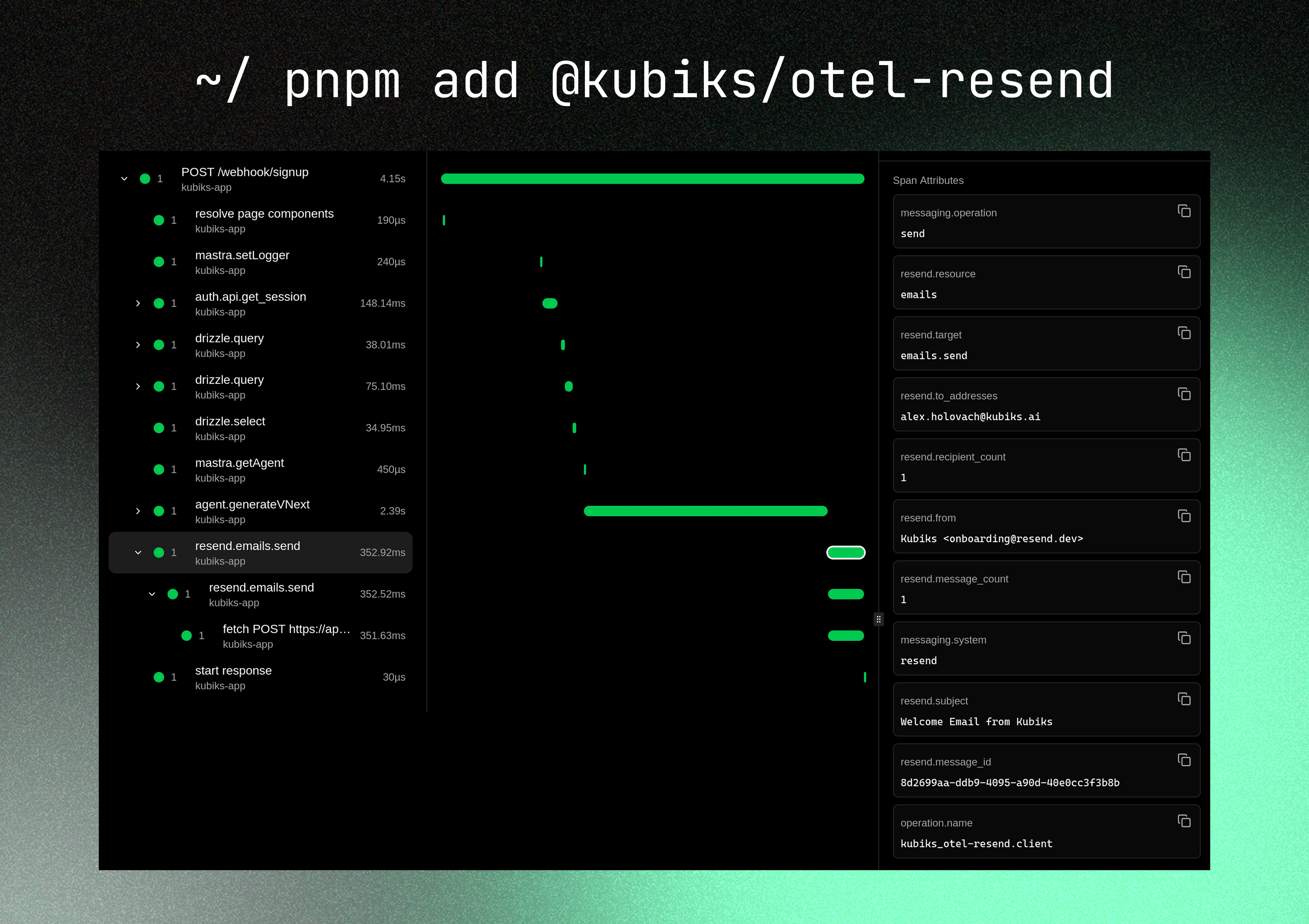
`@kubiks/otel-resend` provides OpenTelemetry instrumentation for the [Resend](https://resend.com) email service Node.js SDK. Capture spans for every email operation with detailed metadata about recipients, subjects, and delivery status.

<Frame>
  <img src="https://mintcdn.com/kubiks-fb8cce26/aWqkpsvTx2hc17v8/images/otel/otel-resend-trace.png?fit=max&auto=format&n=aWqkpsvTx2hc17v8&q=85&s=07346d64d0b3d1450a91ffd3df6cf1a3" alt="Resend Trace Visualization" width="3379" height="2386" data-path="images/otel/otel-resend-trace.png" />
</Frame>

<Note>
  Visualize your email operations with detailed span information including recipients, subject lines, and delivery status—without capturing sensitive email content.
</Note>

## Installation

<CodeGroup>
  ```bash npm theme={null}
  npm install @kubiks/otel-resend
  ```

  ```bash pnpm theme={null}
  pnpm add @kubiks/otel-resend
  ```

  ```bash yarn theme={null}
  yarn add @kubiks/otel-resend
  ```
</CodeGroup>

<Warning>
  **Peer Dependencies:** `@opentelemetry/api` >= 1.9.0, `resend` >= 3.0.0
</Warning>

## Quick Start

```typescript theme={null}
import { Resend } from "resend";
import { instrumentResend } from "@kubiks/otel-resend";

const resend = instrumentResend(new Resend(process.env.RESEND_API_KEY!));

await resend.emails.send({
  from: "hello@example.com",
  to: ["user@example.com"],
  subject: "Welcome",
  html: "<p>Hello world</p>",
});
```

<Tip>
  `instrumentResend` wraps the instance you already use—no configuration changes needed. Every SDK call creates a client span with useful attributes.
</Tip>

## What Gets Traced

This instrumentation specifically wraps the `resend.emails.send` method (and its alias `resend.emails.create`), creating a single clean span for each email send operation.

<Info>
  Only metadata is captured—email content (HTML, text, attachments) is never included in traces for privacy and security.
</Info>

## Span Attributes

Each span includes rich metadata about the email operation:

| Attribute                | Description                                         | Example                                 |
| ------------------------ | --------------------------------------------------- | --------------------------------------- |
| `messaging.system`       | Constant value `resend`                             | `resend`                                |
| `messaging.operation`    | Operation type                                      | `send`                                  |
| `resend.resource`        | Resource name                                       | `emails`                                |
| `resend.target`          | Full operation target                               | `emails.send`                           |
| `resend.to_addresses`    | Comma-separated TO addresses                        | `user@example.com, another@example.com` |
| `resend.cc_addresses`    | Comma-separated CC addresses (if present)           | `cc@example.com`                        |
| `resend.bcc_addresses`   | Comma-separated BCC addresses (if present)          | `bcc@example.com`                       |
| `resend.recipient_count` | Total number of recipients                          | `3`                                     |
| `resend.from`            | Sender email address                                | `noreply@example.com`                   |
| `resend.subject`         | Email subject                                       | `Welcome to our service`                |
| `resend.template_id`     | Template ID (if using templates)                    | `tmpl_123`                              |
| `resend.message_id`      | Message ID returned by Resend                       | `email_123`                             |
| `resend.message_count`   | Number of messages sent (always 1 for single sends) | `1`                                     |

<Warning>
  The instrumentation captures email addresses and metadata to help with debugging and monitoring, while avoiding sensitive email content.
</Warning>

## Usage Examples

### Basic Email

<CodeGroup>
  ```typescript Simple Email theme={null}
  import { resend } from "@/lib/resend";

  await resend.emails.send({
    from: "noreply@example.com",
    to: "user@example.com",
    subject: "Welcome to our platform",
    html: "<h1>Welcome!</h1><p>Thanks for signing up.</p>",
  });

  // Traced with:
  // - resend.from: "noreply@example.com"
  // - resend.to_addresses: "user@example.com"
  // - resend.subject: "Welcome to our platform"
  // - resend.recipient_count: 1
  ```

  ```typescript Multiple Recipients theme={null}
  import { resend } from "@/lib/resend";

  await resend.emails.send({
    from: "newsletter@example.com",
    to: ["user1@example.com", "user2@example.com", "user3@example.com"],
    subject: "Monthly Newsletter",
    html: "<h1>This Month's Updates</h1>",
  });

  // Traced with:
  // - resend.to_addresses: "user1@example.com, user2@example.com, user3@example.com"
  // - resend.recipient_count: 3
  ```

  ```typescript Plain Text Email theme={null}
  import { resend } from "@/lib/resend";

  await resend.emails.send({
    from: "support@example.com",
    to: "user@example.com",
    subject: "Password Reset",
    text: "Click here to reset your password: https://example.com/reset",
  });
  ```
</CodeGroup>

### With CC and BCC

```typescript theme={null}
import { resend } from "@/lib/resend";

await resend.emails.send({
  from: "sales@example.com",
  to: "customer@example.com",
  cc: ["manager@example.com", "team@example.com"],
  bcc: "archive@example.com",
  subject: "Project Proposal",
  html: "<p>Please find the proposal attached.</p>",
});

// Traced with:
// - resend.to_addresses: "customer@example.com"
// - resend.cc_addresses: "manager@example.com, team@example.com"
// - resend.bcc_addresses: "archive@example.com"
// - resend.recipient_count: 4
```

<Info>
  BCC addresses are included in the span but remain hidden from other recipients as expected.
</Info>

### Using Email Templates

<CodeGroup>
  ```typescript React Email Template theme={null}
  import { resend } from "@/lib/resend";
  import { WelcomeEmail } from "@/emails/welcome";

  await resend.emails.send({
    from: "onboarding@example.com",
    to: "user@example.com",
    subject: "Welcome aboard!",
    react: WelcomeEmail({ name: "John" }),
  });
  ```

  ```typescript Resend Template theme={null}
  import { resend } from "@/lib/resend";

  await resend.emails.send({
    from: "notifications@example.com",
    to: "user@example.com",
    subject: "Order Confirmation",
    template: "order-confirmation",
    template_id: "tmpl_abc123",
  });

  // Traced with:
  // - resend.template_id: "tmpl_abc123"
  ```
</CodeGroup>

### With Attachments

```typescript theme={null}
import { resend } from "@/lib/resend";
import fs from "fs";

await resend.emails.send({
  from: "documents@example.com",
  to: "user@example.com",
  subject: "Your Invoice",
  html: "<p>Please find your invoice attached.</p>",
  attachments: [
    {
      filename: "invoice.pdf",
      content: fs.readFileSync("./invoice.pdf"),
    },
  ],
});

// Note: Attachment content is NOT captured in traces
```

### Transactional Emails

<CodeGroup>
  ```typescript Password Reset theme={null}
  import { resend } from "@/lib/resend";

  export async function sendPasswordResetEmail(email: string, token: string) {
    await resend.emails.send({
      from: "security@example.com",
      to: email,
      subject: "Reset your password",
      html: `
        <h1>Password Reset Request</h1>
        <p>Click the link below to reset your password:</p>
        <a href="https://example.com/reset?token=${token}">Reset Password</a>
        <p>This link expires in 1 hour.</p>
      `,
    });
  }
  ```

  ```typescript Email Verification theme={null}
  import { resend } from "@/lib/resend";

  export async function sendVerificationEmail(email: string, code: string) {
    await resend.emails.send({
      from: "verify@example.com",
      to: email,
      subject: "Verify your email address",
      html: `
        <h1>Verify Your Email</h1>
        <p>Your verification code is: <strong>${code}</strong></p>
        <p>This code expires in 15 minutes.</p>
      `,
    });
  }
  ```

  ```typescript Order Confirmation theme={null}
  import { resend } from "@/lib/resend";

  export async function sendOrderConfirmation(
    email: string,
    orderNumber: string,
    amount: number
  ) {
    await resend.emails.send({
      from: "orders@example.com",
      to: email,
      subject: `Order Confirmation #${orderNumber}`,
      html: `
        <h1>Thank You for Your Order!</h1>
        <p>Order Number: ${orderNumber}</p>
        <p>Total: $${amount.toFixed(2)}</p>
      `,
    });
  }
  ```
</CodeGroup>

## Complete Integration Example

Here's a complete example of Resend with OpenTelemetry in a Next.js application:

```typescript lib/resend.ts theme={null}
import { Resend } from "resend";
import { instrumentResend } from "@kubiks/otel-resend";

export const resend = instrumentResend(
  new Resend(process.env.RESEND_API_KEY!)
);
```

```typescript lib/email.ts theme={null}
import { resend } from "@/lib/resend";

export async function sendWelcomeEmail(email: string, name: string) {
  try {
    const { data, error } = await resend.emails.send({
      from: "onboarding@example.com",
      to: email,
      subject: `Welcome ${name}!`,
      html: `
        <h1>Welcome to our platform, ${name}!</h1>
        <p>We're excited to have you on board.</p>
      `,
    });

    if (error) {
      console.error("Failed to send welcome email:", error);
      return { success: false, error };
    }

    return { success: true, messageId: data?.id };
  } catch (error) {
    console.error("Error sending email:", error);
    return { success: false, error };
  }
}

export async function sendNotification(
  email: string,
  subject: string,
  message: string
) {
  const { data, error } = await resend.emails.send({
    from: "notifications@example.com",
    to: email,
    subject,
    html: `<p>${message}</p>`,
  });

  return { data, error };
}
```

```typescript app/api/auth/signup/route.ts theme={null}
import { NextRequest, NextResponse } from "next/server";
import { sendWelcomeEmail } from "@/lib/email";

export async function POST(request: NextRequest) {
  const { email, name } = await request.json();

  // Create user...
  
  // Send welcome email (automatically traced)
  const result = await sendWelcomeEmail(email, name);

  if (!result.success) {
    return NextResponse.json(
      { error: "Failed to send welcome email" },
      { status: 500 }
    );
  }

  return NextResponse.json({ 
    success: true,
    messageId: result.messageId 
  });
}
```

```typescript app/actions/email.ts theme={null}
"use server";

import { resend } from "@/lib/resend";

export async function sendContactFormEmail(
  name: string,
  email: string,
  message: string
) {
  const { data, error } = await resend.emails.send({
    from: "contact@example.com",
    to: "support@example.com",
    replyTo: email,
    subject: `Contact Form: ${name}`,
    html: `
      <h2>New Contact Form Submission</h2>
      <p><strong>Name:</strong> ${name}</p>
      <p><strong>Email:</strong> ${email}</p>
      <p><strong>Message:</strong></p>
      <p>${message}</p>
    `,
  });

  if (error) {
    return { success: false, error: error.message };
  }

  return { success: true, messageId: data?.id };
}
```

## Best Practices

<AccordionGroup>
  <Accordion title="Use Environment Variables">
    Always store API keys in environment variables:

    ```typescript theme={null}
    const resend = instrumentResend(
      new Resend(process.env.RESEND_API_KEY!)
    );
    ```

    Never commit API keys to version control.
  </Accordion>

  <Accordion title="Handle Errors Gracefully">
    Always check for errors when sending emails:

    ```typescript theme={null}
    const { data, error } = await resend.emails.send({
      from: "noreply@example.com",
      to: email,
      subject: "Test",
      html: "<p>Test</p>",
    });

    if (error) {
      console.error("Email error:", error);
      // Handle error appropriately
      return;
    }

    console.log("Email sent:", data?.id);
    ```
  </Accordion>

  <Accordion title="Use Verified Domains">
    Set up domain verification in Resend for production:

    ```typescript theme={null}
    // Use your verified domain
    from: "noreply@yourdomain.com"

    // Not: "noreply@example.com"
    ```
  </Accordion>

  <Accordion title="Implement Rate Limiting">
    Be mindful of Resend rate limits and implement appropriate rate limiting:

    ```typescript theme={null}
    import { Ratelimit } from "@upstash/ratelimit";
    import { Redis } from "@upstash/redis";

    const ratelimit = new Ratelimit({
      redis: Redis.fromEnv(),
      limiter: Ratelimit.slidingWindow(10, "1 h"), // 10 emails per hour
    });

    export async function sendEmail(to: string, subject: string, html: string) {
      const { success } = await ratelimit.limit(to);
      
      if (!success) {
        throw new Error("Rate limit exceeded");
      }

      return await resend.emails.send({
        from: "noreply@example.com",
        to,
        subject,
        html,
      });
    }
    ```
  </Accordion>

  <Accordion title="Use Email Templates">
    Use React Email or Resend templates for maintainable email content:

    ```typescript theme={null}
    import { WelcomeEmail } from "@/emails/welcome";

    await resend.emails.send({
      from: "onboarding@example.com",
      to: email,
      subject: "Welcome!",
      react: WelcomeEmail({ name: userName }),
    });
    ```
  </Accordion>
</AccordionGroup>

## Troubleshooting

<AccordionGroup>
  <Accordion title="Spans Not Appearing">
    Ensure OpenTelemetry is properly configured:

    ```typescript theme={null}
    import { NodeSDK } from "@opentelemetry/sdk-node";

    const sdk = new NodeSDK({
      // ... configuration
    });

    sdk.start();
    ```
  </Accordion>

  <Accordion title="Missing Message ID">
    The message ID is only available after successful email sending. Check for errors:

    ```typescript theme={null}
    const { data, error } = await resend.emails.send({ ... });

    if (error) {
      console.error("No message ID because of error:", error);
    } else {
      console.log("Message ID:", data?.id);
    }
    ```
  </Accordion>

  <Accordion title="Emails Not Delivering">
    Check your Resend dashboard for delivery status. Common issues:

    * Domain not verified
    * Invalid recipient address
    * Rate limits exceeded
    * API key issues
  </Accordion>
</AccordionGroup>

## Integration with React Email

<CodeGroup>
  ```typescript Email Component theme={null}
  // emails/welcome.tsx
  import {
    Body,
    Container,
    Head,
    Heading,
    Html,
    Link,
    Preview,
    Text,
  } from "@react-email/components";

  interface WelcomeEmailProps {
    name: string;
  }

  export function WelcomeEmail({ name }: WelcomeEmailProps) {
    return (
      <Html>
        <Head />
        <Preview>Welcome to our platform!</Preview>
        <Body style={main}>
          <Container style={container}>
            <Heading style={h1}>Welcome, {name}!</Heading>
            <Text style={text}>
              Thanks for joining us. We're excited to have you on board.
            </Text>
            <Link href="https://example.com/getting-started" style={link}>
              Get Started
            </Link>
          </Container>
        </Body>
      </Html>
    );
  }

  const main = { backgroundColor: "#f6f9fc", fontFamily: "sans-serif" };
  const container = { margin: "0 auto", padding: "20px 0 48px" };
  const h1 = { fontSize: "32px", fontWeight: "bold" };
  const text = { fontSize: "16px", lineHeight: "26px" };
  const link = { color: "#5e6ad2", textDecoration: "underline" };
  ```

  ```typescript Send Email theme={null}
  import { resend } from "@/lib/resend";
  import { WelcomeEmail } from "@/emails/welcome";

  await resend.emails.send({
    from: "onboarding@example.com",
    to: "user@example.com",
    subject: "Welcome aboard!",
    react: WelcomeEmail({ name: "John" }),
  });
  ```
</CodeGroup>

## Resources

<CardGroup cols={2}>
  <Card title="Resend Documentation" icon="book" href="https://resend.com/docs">
    Learn more about Resend
  </Card>

  <Card title="GitHub Repository" icon="github" href="https://github.com/kubiks-inc/otel/tree/main/packages/otel-resend">
    View source code and examples
  </Card>

  <Card title="npm Package" icon="box" href="https://www.npmjs.com/package/@kubiks/otel-resend">
    View package on npm
  </Card>

  <Card title="React Email" icon="react" href="https://react.email">
    Build emails with React components
  </Card>
</CardGroup>

## License

MIT