> ## Documentation Index
> Fetch the complete documentation index at: https://docs.kubiks.ai/llms.txt
> Use this file to discover all available pages before exploring further.
# E2B
> OpenTelemetry instrumentation for E2B code execution
## Overview
`@kubiks/otel-e2b` provides comprehensive OpenTelemetry instrumentation for [E2B (Code Interpreter)](https://e2b.dev/). Add distributed tracing to your AI-powered code execution, sandbox operations, and code interpreter workflows with automatic instrumentation.
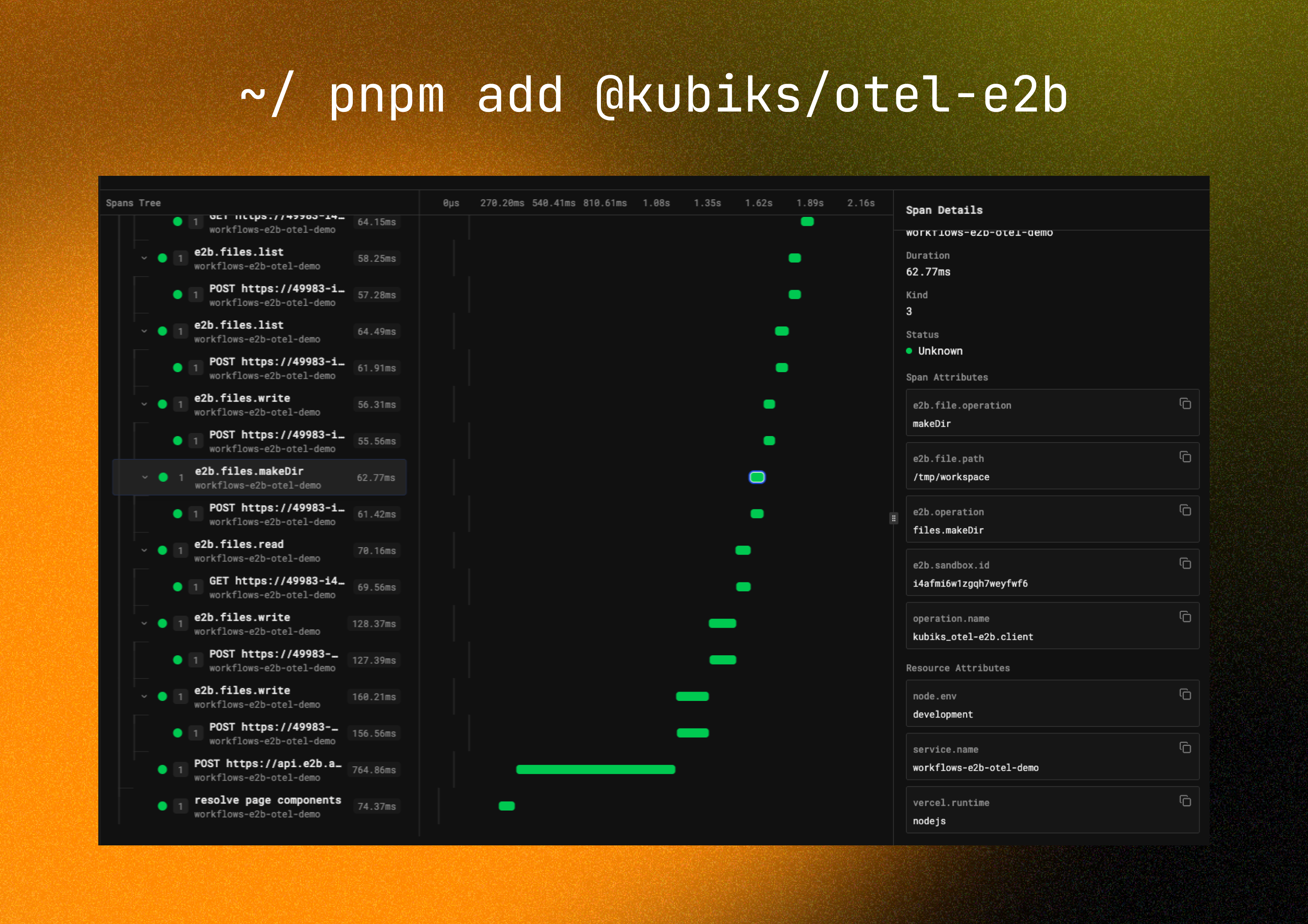 Visualize your E2B operations with detailed span information including code execution, sandbox lifecycle, and performance metrics.
## Installation
```bash npm theme={null}
npm install @kubiks/otel-e2b
```
```bash pnpm theme={null}
pnpm add @kubiks/otel-e2b
```
```bash yarn theme={null}
yarn add @kubiks/otel-e2b
```
**Peer Dependencies:** `@opentelemetry/api` >= 1.9.0, `@e2b/code-interpreter` >= 0.1.0
## Supported Frameworks
Works with any TypeScript framework and Node.js runtime:
App Router & Pages Router
High-performance server
Enterprise framework
Classic Node.js server
Full-stack framework
Modern web framework
## Supported Platforms
Works with any observability platform that supports OpenTelemetry:
* [Kubiks](https://kubiks.ai)
* [Sentry](https://sentry.io)
* [Axiom](https://axiom.co)
* [Datadog](https://www.datadoghq.com)
* [New Relic](https://newrelic.com)
* [SigNoz](https://signoz.io)
* And many more...
## Quick Start
Use `E2BInstrumentation` to add tracing to your E2B code interpreter:
```typescript theme={null}
import { CodeInterpreter } from '@e2b/code-interpreter';
import { E2BInstrumentation } from '@kubiks/otel-e2b';
import { registerOTel } from '@vercel/otel';
// Register OpenTelemetry with E2B instrumentation
export function register() {
registerOTel({
serviceName: 'your-app',
instrumentations: [
new E2BInstrumentation(),
],
});
}
// Create and use code interpreter - all operations are automatically traced
const sandbox = await CodeInterpreter.create({
apiKey: process.env.E2B_API_KEY,
});
// Execute Python code - fully traced
const execution = await sandbox.notebook.execCell('print("Hello, World!")');
console.log(execution.text);
await sandbox.close();
```
This is the simplest approach—just add the instrumentation and all E2B operations are automatically traced!
## Configuration Options
```typescript theme={null}
new E2BInstrumentation({
captureCodeContent: true, // Include code in traces (default: true)
maxCodeLength: 1000, // Max code length (default: 1000)
captureOutput: true, // Include execution output (default: true)
maxOutputLength: 1000, // Max output length (default: 1000)
})
```
By default, code and output are captured in spans. You can disable this by setting the respective options to `false` for sensitive environments.
## What You Get
Each E2B operation automatically creates a span with rich telemetry data:
* **Span name**: `e2b.sandbox.create`, `e2b.notebook.execCell`, `e2b.filesystem.write`, etc.
* **Operation type**: Type of E2B operation (create, execute, read, write, etc.)
* **Code content**: The code being executed (configurable)
* **Execution output**: Results from code execution (configurable)
* **Sandbox ID**: Unique identifier for the sandbox
* **Execution time**: Duration of operations
* Sandbox creation and initialization
* Sandbox status changes
* Sandbox termination
* Resource allocation and usage
* Cell execution start and completion
* Code content and language
* Execution results (stdout, stderr, return values)
* Execution errors and stack traces
* File reads and writes
* File paths and sizes
* File system operations
* Exceptions are recorded with stack traces
* Proper span status (OK, ERROR)
* Error messages and codes
## Span Attributes
The instrumentation adds the following attributes to each span:
| Attribute | Description | Example |
| ---------------------- | -------------------- | ------------------- |
| `e2b.operation` | Type of operation | `notebook.execCell` |
| `e2b.sandbox.id` | Sandbox identifier | `sandbox-abc123` |
| `e2b.code` | Code being executed | `print("Hello")` |
| `e2b.language` | Programming language | `python` |
| `e2b.output` | Execution output | `Hello\n` |
| `e2b.execution.status` | Execution status | `success` |
## Usage Examples
### Basic Code Execution
```typescript Simple Execution theme={null}
import { CodeInterpreter } from '@e2b/code-interpreter';
const sandbox = await CodeInterpreter.create({
apiKey: process.env.E2B_API_KEY,
});
// Traced as: e2b.notebook.execCell
const result = await sandbox.notebook.execCell(`
import numpy as np
data = np.array([1, 2, 3, 4, 5])
print(f"Mean: {data.mean()}")
`);
console.log(result.text); // Mean: 3.0
await sandbox.close();
```
```typescript Multiple Cells theme={null}
import { CodeInterpreter } from '@e2b/code-interpreter';
const sandbox = await CodeInterpreter.create({
apiKey: process.env.E2B_API_KEY,
});
// Each cell execution is traced separately
await sandbox.notebook.execCell('import pandas as pd');
await sandbox.notebook.execCell('df = pd.DataFrame({"a": [1, 2, 3]})');
const result = await sandbox.notebook.execCell('print(df.describe())');
console.log(result.text);
await sandbox.close();
```
```typescript With Error Handling theme={null}
import { CodeInterpreter } from '@e2b/code-interpreter';
const sandbox = await CodeInterpreter.create({
apiKey: process.env.E2B_API_KEY,
});
try {
// Errors are captured in traces
const result = await sandbox.notebook.execCell('1 / 0');
} catch (error) {
console.error('Execution failed:', error);
}
await sandbox.close();
```
### File Operations
```typescript theme={null}
import { CodeInterpreter } from '@e2b/code-interpreter';
const sandbox = await CodeInterpreter.create({
apiKey: process.env.E2B_API_KEY,
});
// Traced as: e2b.filesystem.write
await sandbox.filesystem.write('/data/input.csv', 'name,age\nAlice,30\nBob,25');
// Execute code that uses the file
const result = await sandbox.notebook.execCell(`
import pandas as pd
df = pd.read_csv('/data/input.csv')
print(df.head())
`);
// Traced as: e2b.filesystem.read
const output = await sandbox.filesystem.read('/data/output.csv');
await sandbox.close();
```
### Streaming Execution
```typescript theme={null}
import { CodeInterpreter } from '@e2b/code-interpreter';
const sandbox = await CodeInterpreter.create({
apiKey: process.env.E2B_API_KEY,
});
// Stream execution results - traced from start to finish
const execution = sandbox.notebook.execCell(`
for i in range(10):
print(f"Processing {i}")
time.sleep(0.1)
`);
// Process streaming output
execution.onStdout((output) => {
console.log('stdout:', output);
});
execution.onStderr((error) => {
console.error('stderr:', error);
});
await execution;
await sandbox.close();
```
## Complete Integration Example
Here's a complete example of E2B with OpenTelemetry in a Next.js application:
```typescript lib/e2b.ts theme={null}
import { CodeInterpreter } from '@e2b/code-interpreter';
export async function executeCode(code: string) {
const sandbox = await CodeInterpreter.create({
apiKey: process.env.E2B_API_KEY,
});
try {
const result = await sandbox.notebook.execCell(code);
return {
success: true,
output: result.text,
error: result.error,
};
} finally {
await sandbox.close();
}
}
```
```typescript instrumentation.ts theme={null}
import { registerOTel } from '@vercel/otel';
import { E2BInstrumentation } from '@kubiks/otel-e2b';
export function register() {
registerOTel({
serviceName: 'your-app',
instrumentations: [
new E2BInstrumentation({
captureCodeContent: true,
captureOutput: true,
}),
],
});
}
```
```typescript app/api/execute/route.ts theme={null}
import { NextRequest, NextResponse } from 'next/server';
import { executeCode } from '@/lib/e2b';
export async function POST(request: NextRequest) {
const { code } = await request.json();
// Automatically traced
const result = await executeCode(code);
return NextResponse.json(result);
}
```
## Best Practices
Creating sandboxes is expensive. Reuse them for multiple operations:
```typescript theme={null}
const sandbox = await CodeInterpreter.create({
apiKey: process.env.E2B_API_KEY,
});
// Execute multiple cells in the same sandbox
await sandbox.notebook.execCell(code1);
await sandbox.notebook.execCell(code2);
await sandbox.notebook.execCell(code3);
await sandbox.close();
```
Set appropriate timeouts for long-running code:
```typescript theme={null}
const sandbox = await CodeInterpreter.create({
apiKey: process.env.E2B_API_KEY,
timeout: 60_000, // 60 seconds
});
```
Always close sandboxes to avoid resource leaks:
```typescript theme={null}
try {
const result = await sandbox.notebook.execCell(code);
return result;
} finally {
await sandbox.close();
}
```
Use traces to understand sandbox usage patterns and optimize costs.
## Performance Considerations
The instrumentation adds minimal overhead for tracing operations.
Use OpenTelemetry sampling for high-volume applications:
```typescript theme={null}
import { TraceIdRatioBasedSampler } from '@opentelemetry/sdk-trace-base';
registerOTel({
serviceName: 'your-app',
sampler: new TraceIdRatioBasedSampler(0.1), // Sample 10% of traces
});
```
## Troubleshooting
Ensure OpenTelemetry is initialized before creating E2B sandboxes:
```typescript theme={null}
// In instrumentation.ts or instrumentation.node.ts
export function register() {
registerOTel({
serviceName: 'your-app',
instrumentations: [new E2BInstrumentation()],
});
}
```
Check that `captureCodeContent` is enabled:
```typescript theme={null}
new E2BInstrumentation({
captureCodeContent: true,
maxCodeLength: 2000,
})
```
Verify your E2B API key is set correctly:
```typescript theme={null}
const sandbox = await CodeInterpreter.create({
apiKey: process.env.E2B_API_KEY, // Make sure this is set
});
```
## Resources
Learn more about E2B
View source code and examples
View package on npm
Found a bug? Let us know!
## License
MIT
Visualize your E2B operations with detailed span information including code execution, sandbox lifecycle, and performance metrics.
## Installation
```bash npm theme={null}
npm install @kubiks/otel-e2b
```
```bash pnpm theme={null}
pnpm add @kubiks/otel-e2b
```
```bash yarn theme={null}
yarn add @kubiks/otel-e2b
```
**Peer Dependencies:** `@opentelemetry/api` >= 1.9.0, `@e2b/code-interpreter` >= 0.1.0
## Supported Frameworks
Works with any TypeScript framework and Node.js runtime:
App Router & Pages Router
High-performance server
Enterprise framework
Classic Node.js server
Full-stack framework
Modern web framework
## Supported Platforms
Works with any observability platform that supports OpenTelemetry:
* [Kubiks](https://kubiks.ai)
* [Sentry](https://sentry.io)
* [Axiom](https://axiom.co)
* [Datadog](https://www.datadoghq.com)
* [New Relic](https://newrelic.com)
* [SigNoz](https://signoz.io)
* And many more...
## Quick Start
Use `E2BInstrumentation` to add tracing to your E2B code interpreter:
```typescript theme={null}
import { CodeInterpreter } from '@e2b/code-interpreter';
import { E2BInstrumentation } from '@kubiks/otel-e2b';
import { registerOTel } from '@vercel/otel';
// Register OpenTelemetry with E2B instrumentation
export function register() {
registerOTel({
serviceName: 'your-app',
instrumentations: [
new E2BInstrumentation(),
],
});
}
// Create and use code interpreter - all operations are automatically traced
const sandbox = await CodeInterpreter.create({
apiKey: process.env.E2B_API_KEY,
});
// Execute Python code - fully traced
const execution = await sandbox.notebook.execCell('print("Hello, World!")');
console.log(execution.text);
await sandbox.close();
```
This is the simplest approach—just add the instrumentation and all E2B operations are automatically traced!
## Configuration Options
```typescript theme={null}
new E2BInstrumentation({
captureCodeContent: true, // Include code in traces (default: true)
maxCodeLength: 1000, // Max code length (default: 1000)
captureOutput: true, // Include execution output (default: true)
maxOutputLength: 1000, // Max output length (default: 1000)
})
```
By default, code and output are captured in spans. You can disable this by setting the respective options to `false` for sensitive environments.
## What You Get
Each E2B operation automatically creates a span with rich telemetry data:
* **Span name**: `e2b.sandbox.create`, `e2b.notebook.execCell`, `e2b.filesystem.write`, etc.
* **Operation type**: Type of E2B operation (create, execute, read, write, etc.)
* **Code content**: The code being executed (configurable)
* **Execution output**: Results from code execution (configurable)
* **Sandbox ID**: Unique identifier for the sandbox
* **Execution time**: Duration of operations
* Sandbox creation and initialization
* Sandbox status changes
* Sandbox termination
* Resource allocation and usage
* Cell execution start and completion
* Code content and language
* Execution results (stdout, stderr, return values)
* Execution errors and stack traces
* File reads and writes
* File paths and sizes
* File system operations
* Exceptions are recorded with stack traces
* Proper span status (OK, ERROR)
* Error messages and codes
## Span Attributes
The instrumentation adds the following attributes to each span:
| Attribute | Description | Example |
| ---------------------- | -------------------- | ------------------- |
| `e2b.operation` | Type of operation | `notebook.execCell` |
| `e2b.sandbox.id` | Sandbox identifier | `sandbox-abc123` |
| `e2b.code` | Code being executed | `print("Hello")` |
| `e2b.language` | Programming language | `python` |
| `e2b.output` | Execution output | `Hello\n` |
| `e2b.execution.status` | Execution status | `success` |
## Usage Examples
### Basic Code Execution
```typescript Simple Execution theme={null}
import { CodeInterpreter } from '@e2b/code-interpreter';
const sandbox = await CodeInterpreter.create({
apiKey: process.env.E2B_API_KEY,
});
// Traced as: e2b.notebook.execCell
const result = await sandbox.notebook.execCell(`
import numpy as np
data = np.array([1, 2, 3, 4, 5])
print(f"Mean: {data.mean()}")
`);
console.log(result.text); // Mean: 3.0
await sandbox.close();
```
```typescript Multiple Cells theme={null}
import { CodeInterpreter } from '@e2b/code-interpreter';
const sandbox = await CodeInterpreter.create({
apiKey: process.env.E2B_API_KEY,
});
// Each cell execution is traced separately
await sandbox.notebook.execCell('import pandas as pd');
await sandbox.notebook.execCell('df = pd.DataFrame({"a": [1, 2, 3]})');
const result = await sandbox.notebook.execCell('print(df.describe())');
console.log(result.text);
await sandbox.close();
```
```typescript With Error Handling theme={null}
import { CodeInterpreter } from '@e2b/code-interpreter';
const sandbox = await CodeInterpreter.create({
apiKey: process.env.E2B_API_KEY,
});
try {
// Errors are captured in traces
const result = await sandbox.notebook.execCell('1 / 0');
} catch (error) {
console.error('Execution failed:', error);
}
await sandbox.close();
```
### File Operations
```typescript theme={null}
import { CodeInterpreter } from '@e2b/code-interpreter';
const sandbox = await CodeInterpreter.create({
apiKey: process.env.E2B_API_KEY,
});
// Traced as: e2b.filesystem.write
await sandbox.filesystem.write('/data/input.csv', 'name,age\nAlice,30\nBob,25');
// Execute code that uses the file
const result = await sandbox.notebook.execCell(`
import pandas as pd
df = pd.read_csv('/data/input.csv')
print(df.head())
`);
// Traced as: e2b.filesystem.read
const output = await sandbox.filesystem.read('/data/output.csv');
await sandbox.close();
```
### Streaming Execution
```typescript theme={null}
import { CodeInterpreter } from '@e2b/code-interpreter';
const sandbox = await CodeInterpreter.create({
apiKey: process.env.E2B_API_KEY,
});
// Stream execution results - traced from start to finish
const execution = sandbox.notebook.execCell(`
for i in range(10):
print(f"Processing {i}")
time.sleep(0.1)
`);
// Process streaming output
execution.onStdout((output) => {
console.log('stdout:', output);
});
execution.onStderr((error) => {
console.error('stderr:', error);
});
await execution;
await sandbox.close();
```
## Complete Integration Example
Here's a complete example of E2B with OpenTelemetry in a Next.js application:
```typescript lib/e2b.ts theme={null}
import { CodeInterpreter } from '@e2b/code-interpreter';
export async function executeCode(code: string) {
const sandbox = await CodeInterpreter.create({
apiKey: process.env.E2B_API_KEY,
});
try {
const result = await sandbox.notebook.execCell(code);
return {
success: true,
output: result.text,
error: result.error,
};
} finally {
await sandbox.close();
}
}
```
```typescript instrumentation.ts theme={null}
import { registerOTel } from '@vercel/otel';
import { E2BInstrumentation } from '@kubiks/otel-e2b';
export function register() {
registerOTel({
serviceName: 'your-app',
instrumentations: [
new E2BInstrumentation({
captureCodeContent: true,
captureOutput: true,
}),
],
});
}
```
```typescript app/api/execute/route.ts theme={null}
import { NextRequest, NextResponse } from 'next/server';
import { executeCode } from '@/lib/e2b';
export async function POST(request: NextRequest) {
const { code } = await request.json();
// Automatically traced
const result = await executeCode(code);
return NextResponse.json(result);
}
```
## Best Practices
Creating sandboxes is expensive. Reuse them for multiple operations:
```typescript theme={null}
const sandbox = await CodeInterpreter.create({
apiKey: process.env.E2B_API_KEY,
});
// Execute multiple cells in the same sandbox
await sandbox.notebook.execCell(code1);
await sandbox.notebook.execCell(code2);
await sandbox.notebook.execCell(code3);
await sandbox.close();
```
Set appropriate timeouts for long-running code:
```typescript theme={null}
const sandbox = await CodeInterpreter.create({
apiKey: process.env.E2B_API_KEY,
timeout: 60_000, // 60 seconds
});
```
Always close sandboxes to avoid resource leaks:
```typescript theme={null}
try {
const result = await sandbox.notebook.execCell(code);
return result;
} finally {
await sandbox.close();
}
```
Use traces to understand sandbox usage patterns and optimize costs.
## Performance Considerations
The instrumentation adds minimal overhead for tracing operations.
Use OpenTelemetry sampling for high-volume applications:
```typescript theme={null}
import { TraceIdRatioBasedSampler } from '@opentelemetry/sdk-trace-base';
registerOTel({
serviceName: 'your-app',
sampler: new TraceIdRatioBasedSampler(0.1), // Sample 10% of traces
});
```
## Troubleshooting
Ensure OpenTelemetry is initialized before creating E2B sandboxes:
```typescript theme={null}
// In instrumentation.ts or instrumentation.node.ts
export function register() {
registerOTel({
serviceName: 'your-app',
instrumentations: [new E2BInstrumentation()],
});
}
```
Check that `captureCodeContent` is enabled:
```typescript theme={null}
new E2BInstrumentation({
captureCodeContent: true,
maxCodeLength: 2000,
})
```
Verify your E2B API key is set correctly:
```typescript theme={null}
const sandbox = await CodeInterpreter.create({
apiKey: process.env.E2B_API_KEY, // Make sure this is set
});
```
## Resources
Learn more about E2B
View source code and examples
View package on npm
Found a bug? Let us know!
## License
MIT